Demo: Analysis#
This example is the continuation of the previous example: filling gaps. This example serves as an introduction to the Analysis module. In the MetObs-toolkit there is a Analysis class, that holds some common methods used in research.
To start, we import the demo dataset.
[6]:
import metobs_toolkit
dataset = metobs_toolkit.Dataset() #Create a new dataset object

#Load the data
dataset.import_data_from_file(
                    template_file=metobs_toolkit.demo_template, #The template file
                    input_data_file=metobs_toolkit.demo_datafile, #The data file
                    input_metadata_file=metobs_toolkit.demo_metadatafile, #The metadata file
                    )
Luchtdruk is present in the datafile, but not found in the template! This column will be ignored.
Neerslagintensiteit is present in the datafile, but not found in the template! This column will be ignored.
Neerslagsom is present in the datafile, but not found in the template! This column will be ignored.
Rukwind is present in the datafile, but not found in the template! This column will be ignored.
Luchtdruk_Zeeniveau is present in the datafile, but not found in the template! This column will be ignored.
Globe Temperatuur is present in the datafile, but not found in the template! This column will be ignored.
The following columns are present in the data file, but not in the template! They are skipped!
 ['Luchtdruk', 'Luchtdruk_Zeeniveau', 'Neerslagintensiteit', 'Globe Temperatuur', 'Neerslagsom', 'Rukwind']
The following columns are found in the metadata, but not in the template and are therefore ignored:
['benaming', 'stad', 'sponsor', 'Network']
Later in this demo we will some landcover information, we extract this for all are stations in the dataset.
[7]:
#Get LCZ, and landcover fractions will be used later on
_lczseries = dataset.get_LCZ()
Creating an Analysis#
The built-in analysis functionality is centered around the Analysis class. This class holds only records that are assumed to be correct. Thus there are no QC outliers or gaps present defined, the data hold by an Analysis is hold in a single dataframe.
We can create an Analysis instance from a Dataset (or from a Station).
[8]:
analysis = metobs_toolkit.Analysis(Dataholder=dataset)
analysis.get_info()
================================================================================
                            General info of Analysis
================================================================================

  -Number of records: 120960
  -Observation types: ['humidity', 'temp', 'wind_direction', 'wind_speed']
  -Available metadata columns: ['lat', 'lon', 'altitude', 'LCZ', 'school', 'g...
  -Stations: ['vlinder01', 'vlinder02', 'vlinder03', 'vlinder04', 'vlinder05'...
  -All known time-derivatives: ['year', 'month', 'hour', 'minute', 'second', ...
[9]:
analysis.df.index.get_level_values('datetime').tz
[9]:
datetime.timezone.utc
We can inspect the stored data from the Analysis.df and Analysis.metadf attributes.
[10]:
analysis.df.head(10)
[10]:
| humidity | temp | wind_direction | wind_speed | ||
|---|---|---|---|---|---|
| datetime | name | ||||
| 2022-09-01 00:00:00+00:00 | vlinder01 | 65.0 | 18.799999 | 65.0 | 1.555556 |
| vlinder02 | 62.0 | 19.400000 | 25.0 | 0.194444 | |
| vlinder03 | 65.0 | 17.000000 | 115.0 | 0.333333 | |
| vlinder04 | 66.0 | 15.900000 | 25.0 | 0.083333 | |
| vlinder05 | 61.0 | 21.100000 | 45.0 | 1.611111 | |
| vlinder06 | 65.0 | 17.700001 | 95.0 | 0.138889 | |
| vlinder07 | 63.0 | 18.100000 | 15.0 | 0.611111 | |
| vlinder08 | 59.0 | 19.200001 | 165.0 | 0.222222 | |
| vlinder09 | 63.0 | 18.000000 | 55.0 | 0.888889 | |
| vlinder10 | 63.0 | 19.100000 | 5.0 | 0.472222 |
[11]:
analysis.metadf.head(10)
[11]:
| lat | lon | altitude | LCZ | school | geometry | |
|---|---|---|---|---|---|---|
| name | ||||||
| vlinder01 | 50.980438 | 3.815763 | NaN | Low plants (LCZ D) | UGent | POINT (3.81576 50.98044) |
| vlinder02 | 51.022381 | 3.709695 | NaN | Large lowrise | UGent | POINT (3.7097 51.02238) |
| vlinder03 | 51.324581 | 4.952109 | NaN | Open midrise | Heilig Graf | POINT (4.95211 51.32458) |
| vlinder04 | 51.335522 | 4.934732 | NaN | Sparsely built | Heilig Graf | POINT (4.93473 51.33552) |
| vlinder05 | 51.052654 | 3.675183 | NaN | Water (LCZ G) | Sint-Barbara | POINT (3.67518 51.05265) |
| vlinder06 | 51.027100 | 4.516300 | NaN | Scattered Trees (LCZ B) | BimSem | POINT (4.5163 51.0271) |
| vlinder07 | 51.030888 | 4.478445 | NaN | Compact midrise | PTS | POINT (4.47845 51.03089) |
| vlinder08 | 51.028130 | 4.477398 | NaN | Compact midrise | TSM | POINT (4.4774 51.02813) |
| vlinder09 | 50.927166 | 4.075722 | NaN | Scattered Trees (LCZ B) | SMI | POINT (4.07572 50.92717) |
| vlinder10 | 50.935555 | 4.041389 | NaN | Compact midrise | SMI | POINT (4.04139 50.93555) |
Analysis methods#
An overview of the available analysis methods can be seen in the documentation of the Analysis class. The relevant methods depend on your data and your interests. As an example, a demonstration of the filter and diurnal cycle of the demo data.
Filtering data#
It is common to filter your data according to specific meteorological phenomena or periods in time. To do this you can use the apply_filter_on_records() method.
NOTE: The filtering will remove data
[12]:
print(f'The initial number of records: {analysis.df.shape[0]}')

#filter to non-windy afternoons
analysis.apply_filter_on_records('(wind_speed <= 2.5) & (hour > 12) & (hour < 20)')

#We can apply multiple consecutive filterings
analysis.apply_filter_on_records('season=="autumn" | season=="winter"') #Be aware of quotation!


print(f'The number of records after filtering: {analysis.df.shape[0]}')
The initial number of records: 120960
The number of records after filtering: 28536
We can also use the metadata to filter to by using apply_filter_on_metadata() method.
[13]:
analysis.apply_filter_on_metadata("LCZ == 'Large lowrise'")
Diurnal cycle#
To make a diurnal cycle plot of your Analysis use the get_diurnal_statistics() method:
[14]:
analysis.plot_diurnal_cycle(colorby='name', #each station is plotted, and colored differently
                            obstype = 'humidity',
                                return_data = False,
                                )
[14]:
<Axes: title={'center': 'Diurnal cycle of humidity grouped per name.'}, xlabel='Diurnal Timestamps (in UTC)', ylabel='humidity (percent)'>
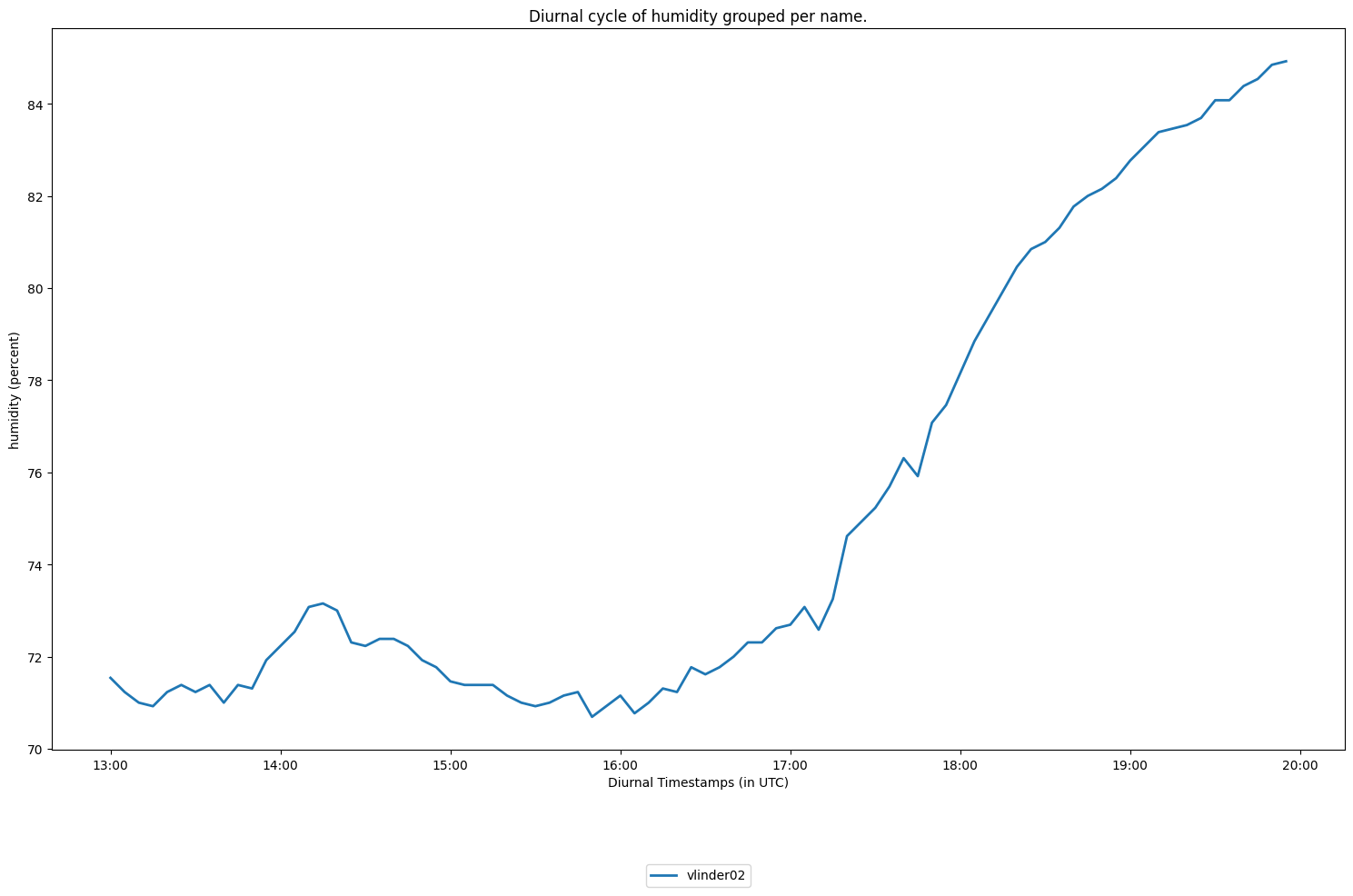
Note: Be aware that we filtered the data to wind-still afternoons in autumn!
If you want to work with the aggregated values, you can use the aggregate_df() method. As illustration we undo the filtering to have some more variability in the data. Then we aggregate the data per LCZ.
[15]:
import numpy as np

#Start with an unfiltered analysis
analysis=metobs_toolkit.Analysis(Dataholder=dataset)

aggdf = analysis.aggregate_df(
                        obstype='temp',
                        agg=["LCZ", "hour"], #by adding hour, we keep the diurnal variation
                        method=np.mean) #the aggregation function to use.
aggdf
[15]:
| temp | ||
|---|---|---|
| LCZ | hour | |
| Compact midrise | 0 | 17.739286 |
| 1 | 17.230398 | |
| 2 | 16.657461 | |
| 3 | 16.421507 | |
| 4 | 16.209682 | |
| ... | ... | ... |
| Water (LCZ G) | 19 | 19.380926 |
| 20 | 18.933889 | |
| 21 | 18.553888 | |
| 22 | 18.320370 | |
| 23 | 18.126852 |
240 rows × 1 columns
Diurnal cycle of differences#
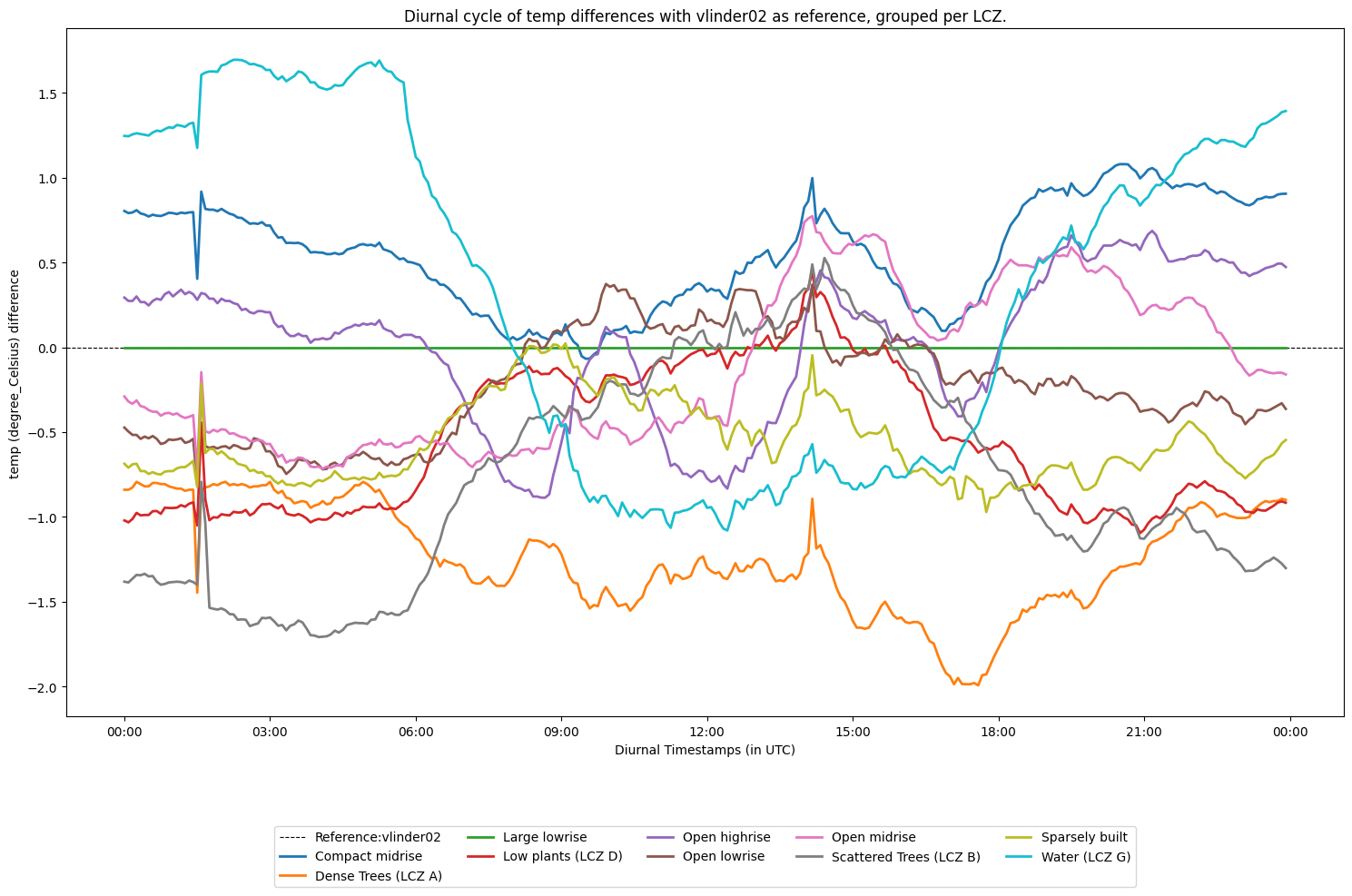
The diurnal cycle of differences is also implemented. The values are the aggregated diurnal differences wrt a reference station.
As an example the diurnal temperature difference cycle is plotted with station vlinder02 as the reference. The aggregation is done per LCZ.
[16]:
analysis.plot_diurnal_cycle_with_reference_station(ref_station='vlinder02',
                                                  obstype='temp',
                                                  colorby='LCZ')
[16]:
<Axes: title={'center': 'Diurnal cycle of temp differences with vlinder02 as reference, grouped per LCZ.'}, xlabel='Diurnal Timestamps (in UTC)', ylabel='temp (degree_Celsius) difference'>