
Introduction to the MetObs-toolkit#
In this introduction, you will learn the principal components and methods in the MetObs-toolkit. Let’s start by importing it.
Since this package is under development, it is often relevant to know the precise version of the toolkit.
[1]:
import metobs_toolkit

#Print out the version of the toolkit
print(metobs_toolkit.__version__)
import xarray as xr
1.0.0a13
The Dataset class#
The Dataset class is for most applications the most important class. It holds all your stations and it’s data. Thus a Dataset is in principal a collection of stations.
Since raw data files often include observations from multiple stations, we import our raw data always directly into a Dataset. We use the Dataset.import_data_from_file() method, to import the raw data into a Dataset.
A key component for importing raw data, is a description of what your data represents and how it is formatted. This is done by providing a template file, that describes how your raw data is structured.
Importing your raw data#
As an example we will import a demo file of raw observations. In order to do that we need to :
Create a template file for our raw data file. The
build_template_prompt()function will guide you in this process. It will ask questions, once you answered them a template file is created. It will also propose some code that you use to import your dataCreate a
DatasetinstanceAdd the raw data into the
Dataset.
[2]:
# Specify the path to your raw data file (we use the demo file as example)
path_to_datafile=metobs_toolkit.demo_datafile

# We will also use a metadata file
path_to_metadatafile=metobs_toolkit.demo_metadatafile
[3]:
%%script true

#Create a template for these data files
metobs_toolkit.build_template_prompt()
[4]:
#specify the path to the templatefile that was created
path_to_templatefile=metobs_toolkit.demo_template #demo file as example!!
Now that we have the datafiles and the templatefile, we create an empty Dataset, and import the data into it.
[5]:
dataset = metobs_toolkit.Dataset() #Create a new dataset object

#Load the data
dataset.import_data_from_file(
                    template_file=path_to_templatefile, #The template file
                    input_data_file=path_to_datafile, #The data file
                    input_metadata_file=path_to_metadatafile, #The metadata file
                    )
Luchtdruk is present in the datafile, but not found in the template! This column will be ignored.
Neerslagintensiteit is present in the datafile, but not found in the template! This column will be ignored.
Neerslagsom is present in the datafile, but not found in the template! This column will be ignored.
Rukwind is present in the datafile, but not found in the template! This column will be ignored.
Luchtdruk_Zeeniveau is present in the datafile, but not found in the template! This column will be ignored.
Globe Temperatuur is present in the datafile, but not found in the template! This column will be ignored.
The following columns are present in the data file, but not in the template! They are skipped!
 ['Luchtdruk', 'Luchtdruk_Zeeniveau', 'Globe Temperatuur', 'Neerslagsom', 'Rukwind', 'Neerslagintensiteit']
The following columns are found in the metadata, but not in the template and are therefore ignored:
['stad', 'benaming', 'sponsor', 'Network']
As can be seen in the printed logs, there is a lot going on when importing the data. That is because tests are applied on your data to check for gaps, and mismatches between data and metadata.
We can now inspect the ´dataset´ further.
The attributes#
The attributes are holding the data of the dataset. Here we present some attributes that can be useful to inspect.
All classes in the MetObs-toolkit have a get_info() methods that prints out an overview of its content.
Dataset.obstypes: A collection ofObstypesthat are known. These observationtypes describe a measurable quantity, and its corresponding units.
[6]:
dataset.obstypes
[6]:
{'temp': Obstype(id=temp_degree_Celsius),
 'humidity': Obstype(id=humidity_percent),
 'radiation_temp': Obstype(id=radiation_temp_degree_Celsius),
 'pressure': Obstype(id=pressure_hectopascal),
 'pressure_at_sea_level': Obstype(id=pressure_at_sea_level_hectopascal),
 'precip': Obstype(id=precip_millimeter / meter ** 2),
 'precip_sum': Obstype(id=precip_sum_millimeter / meter ** 2),
 'wind_speed': Obstype(id=wind_speed_meter / second),
 'wind_gust': Obstype(id=wind_gust_meter / second),
 'wind_direction': Obstype(id=wind_direction_degree)}
[7]:
#Note! The known obstypes are NOT the obstypes for which there are observations.
#To get the obstypes for which there are observations, use:
dataset.present_observations
[7]:
['humidity', 'temp', 'wind_direction', 'wind_speed']
Dataset.template: A template class, that is automatically set up by using the template file. This is only used when data is imported from a file. It has no further use.
[8]:
template = dataset.template

template.get_info() # Prints out how the template maps raw data
================================================================================
                            General info of Template
================================================================================


--- Data obstypes map ---

  -temp: Temperatuur
    -raw data in degC
    -description: 2mT passive
  -humidity: Vochtigheid
    -raw data in percent
    -description: 2m relative humidity passive
  -wind_speed: Windsnelheid
    -raw data in km/h
    -description: Average 2m  10-min windspeed
  -wind_direction: Windrichting
    -raw data in degrees
    -description: Average 2m  10-min windspeed, north is zero in CW direction...

--- Data extra mapping info ---

  -name column (data) <---> Vlinder

--- Data timestamp map ---

  -datetimecolumn <---> None
  -time_column <---> Tijd (UTC)
  -date_column <---> Datum
  -fmt <---> %Y-%m-%d %H:%M:%S
  -Timezone <---> UTC

--- Metadata map ---

  -name <---> Vlinder
  -lat <---> lat
  -lon <---> lon
  -school <---> school
dataset.df: A pandas DataFrame holding all the observation records.
[9]:
dataset.df
[9]:
| value | label | |||
|---|---|---|---|---|
| datetime | obstype | name | ||
| 2022-09-01 00:00:00+00:00 | humidity | vlinder01 | 65.000000 | ok |
| vlinder02 | 62.000000 | ok | ||
| vlinder03 | 65.000000 | ok | ||
| vlinder04 | 66.000000 | ok | ||
| vlinder05 | 61.000000 | ok | ||
| ... | ... | ... | ... | ... |
| 2022-09-15 23:55:00+00:00 | wind_speed | vlinder24 | 0.000000 | ok |
| vlinder25 | 1.972222 | ok | ||
| vlinder26 | 0.027778 | ok | ||
| vlinder27 | 0.000000 | ok | ||
| vlinder28 | 0.000000 | ok |
483840 rows × 2 columns
dataset.metadf: A pandas DataFrame holding all the metadata of the stations.
[10]:
dataset.metadf
[10]:
| lat | lon | altitude | LCZ | school | geometry | |
|---|---|---|---|---|---|---|
| name | ||||||
| vlinder01 | 50.980438 | 3.815763 | NaN | NaN | UGent | POINT (3.81576 50.98044) |
| vlinder02 | 51.022381 | 3.709695 | NaN | NaN | UGent | POINT (3.7097 51.02238) |
| vlinder03 | 51.324581 | 4.952109 | NaN | NaN | Heilig Graf | POINT (4.95211 51.32458) |
| vlinder04 | 51.335522 | 4.934732 | NaN | NaN | Heilig Graf | POINT (4.93473 51.33552) |
| vlinder05 | 51.052654 | 3.675183 | NaN | NaN | Sint-Barbara | POINT (3.67518 51.05265) |
| vlinder06 | 51.027100 | 4.516300 | NaN | NaN | BimSem | POINT (4.5163 51.0271) |
| vlinder07 | 51.030888 | 4.478445 | NaN | NaN | PTS | POINT (4.47845 51.03089) |
| vlinder08 | 51.028130 | 4.477398 | NaN | NaN | TSM | POINT (4.4774 51.02813) |
| vlinder09 | 50.927166 | 4.075722 | NaN | NaN | SMI | POINT (4.07572 50.92717) |
| vlinder10 | 50.935555 | 4.041389 | NaN | NaN | SMI | POINT (4.04139 50.93555) |
| vlinder11 | 51.222424 | 4.381726 | NaN | NaN | Sint-Annacollege | POINT (4.38173 51.22242) |
| vlinder12 | 51.216476 | 4.423440 | NaN | NaN | UGent | POINT (4.42344 51.21648) |
| vlinder13 | 51.212212 | 4.398065 | NaN | NaN | UGent | POINT (4.39807 51.21221) |
| vlinder14 | 51.350616 | 4.315013 | NaN | NaN | UGent | POINT (4.31501 51.35062) |
| vlinder15 | 50.935299 | 4.192600 | NaN | NaN | Sint-Martinus | POINT (4.1926 50.9353) |
| vlinder16 | 51.266850 | 4.293436 | NaN | NaN | Sint-Maarten | POINT (4.29344 51.26685) |
| vlinder17 | 51.065269 | 5.613458 | NaN | NaN | Sint-Augustinusinstituut Bree | POINT (5.61346 51.06527) |
| vlinder18 | 51.136246 | 5.656769 | NaN | NaN | TISM Bree | POINT (5.65677 51.13625) |
| vlinder19 | 50.841454 | 4.363672 | NaN | NaN | UGent | POINT (4.36367 50.84145) |
| vlinder20 | 50.847027 | 4.357971 | NaN | NaN | UGent | POINT (4.35797 50.84703) |
| vlinder21 | 51.260387 | 2.991917 | NaN | NaN | Zeelyceum | POINT (2.99192 51.26039) |
| vlinder22 | 50.989502 | 2.856220 | NaN | NaN | ‘t Saam | POINT (2.85622 50.9895) |
| vlinder23 | 51.260578 | 3.580151 | NaN | NaN | Richtpunt Eeklo | POINT (3.58015 51.26058) |
| vlinder24 | 51.167015 | 3.572062 | NaN | NaN | OLV ten Doorn | POINT (3.57206 51.16702) |
| vlinder25 | 51.154720 | 3.708611 | NaN | NaN | Einstein Atheneum | POINT (3.70861 51.15472) |
| vlinder26 | 51.161758 | 4.997653 | NaN | NaN | Sint Dimpna | POINT (4.99765 51.16176) |
| vlinder27 | 51.058098 | 3.728067 | NaN | NaN | Sec. Kunstinstituut | POINT (3.72807 51.0581) |
| vlinder28 | 51.035294 | 3.769741 | NaN | NaN | GO! Ath. | POINT (3.76974 51.03529) |
Station class#
The stationclass is a representatio of a station. A station holds the following:
Station.sensordata: Timeseries of an observation type. A station can hold multiple sensordata, one for each sensor.Station.site: Each station has a ´Site´ attribute, that holds the information on the location of the station. Metadata related to the station is also stored here.Station.modeldata: In addition to the observations, modeldata timeseries representing the station can be stored. In pracktice, if one would download ERA5 data (using the MetObs-toolkit), the timeseries are stored as modeldata in the Station.
To select a station, one can use the name of the station, which is assumed to be unique for each station.
All the methods and attributes that are present in the Dataset are also applicable on the Station! Thus if your script works on Dataset-level, it also works on station-level.
Only the Dataset.sync_records(), Dataset.buddy_check(), and trivial Dataset-only methods (i.g. Dataset.get_station()) are not defined for Stations.
[11]:
#Select a station
your_station = dataset.get_station('vlinder02')

#Print out some details
your_station.get_info()
================================================================================
                            General info of Station
================================================================================


--- Observational info ---

Station instance with:
  -humidity:
    -humidity observations in percent
    -from 2022-09-01 00:00:00+00:00 -> 2022-09-15 23:55:00+00:00
    -At a resolution of 0 days 00:05:00
    -No outliers present.
    -2 gaps present, a total of 3 missing timestamps.
      -label counts:
        -gap: 3
  -temp:
    -temp observations in degree_Celsius
    -from 2022-09-01 00:00:00+00:00 -> 2022-09-15 23:55:00+00:00
    -At a resolution of 0 days 00:05:00
    -No outliers present.
    -2 gaps present, a total of 3 missing timestamps.
      -label counts:
        -gap: 3
  -wind_direction:
    -wind_direction observations in degree
    -from 2022-09-01 00:00:00+00:00 -> 2022-09-15 23:55:00+00:00
    -At a resolution of 0 days 00:05:00
    -No outliers present.
    -2 gaps present, a total of 3 missing timestamps.
      -label counts:
        -gap: 3
  -wind_speed:
    -wind_speed observations in meter / second
    -from 2022-09-01 00:00:00+00:00 -> 2022-09-15 23:55:00+00:00
    -At a resolution of 0 days 00:05:00
    -No outliers present.
    -2 gaps present, a total of 3 missing timestamps.
      -label counts:
        -gap: 3

--- Metadata info ---

  -Coordinates (51.022379, 3.709695) (latitude, longitude)
  -Altitude is unknown
  -LCZ is unknown
  -Land cover fractions are unknown
  -Extra metadata from the metadata file:
    -school: UGent

--- Modeldata info ---

  -Station instance without model data.
[12]:
# Inspecting the attributes of the station

#Print out info on the Site of the station:
your_station.site.get_info()
================================================================================
                              General Info of Site
================================================================================

Site of vlinder02:
  -Coordinates (51.022379, 3.709695) (latitude, longitude)
  -Altitude is unknown
  -LCZ is unknown
  -Land cover fractions are unknown
  -Extra metadata from the metadata file:
    -school: UGent
[13]:
# All observational data is stored as SensorData

print(your_station.get_sensor('temp'))

# More convenient is to use the pandas dataframe representations,
# similar as with the Dataset

your_station.df
temp data of station vlinder02.
[13]:
| value | label | ||
|---|---|---|---|
| datetime | obstype | ||
| 2022-09-01 00:00:00+00:00 | humidity | 62.000000 | ok |
| temp | 19.400000 | ok | |
| wind_direction | 25.000000 | ok | |
| wind_speed | 0.194444 | ok | |
| 2022-09-01 00:05:00+00:00 | humidity | 62.000000 | ok |
| ... | ... | ... | ... |
| 2022-09-15 23:50:00+00:00 | wind_speed | 0.000000 | ok |
| 2022-09-15 23:55:00+00:00 | humidity | 83.000000 | ok |
| temp | 12.900000 | ok | |
| wind_direction | 295.000000 | ok | |
| wind_speed | 0.000000 | ok |
17280 rows × 2 columns
[14]:
#Or the metadata for this singel station
your_station.metadf
[14]:
| lat | lon | altitude | LCZ | school | geometry | |
|---|---|---|---|---|---|---|
| name | ||||||
| vlinder02 | 51.022381 | 3.709695 | NaN | NaN | UGent | POINT (3.7097 51.02238) |
Plotting timeseries#
Plotting the timeseries can be simply done by using the make_plot() method, on a Dataset or a Station.
[15]:
dataset.make_plot(obstype='temp', #Which observation type to plot. (See dataset.present_observations)
                  colorby='station', #if 'station', each station will be a different color
                  show_outliers=True,
                  show_gaps=True)
[15]:
<Axes: title={'center': 'temp data.'}, xlabel='Timestamps (in UTC)', ylabel='temp (degree_Celsius)'>

[16]:
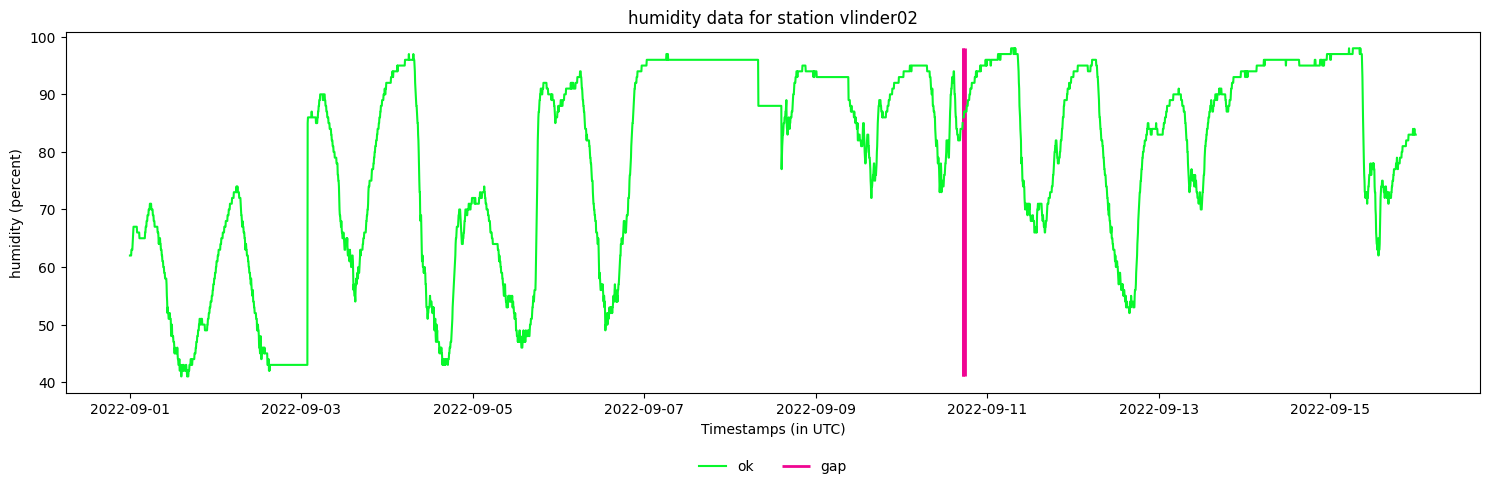
#We can also plot a single station
your_station.make_plot(obstype='humidity',
                       colorby='label') #If 'label', the colors are based on the status/label of an observation.
[16]:
<Axes: title={'center': 'humidity data for station vlinder02'}, xlabel='Timestamps (in UTC)', ylabel='humidity (percent)'>
Common usecases#
Here a collection of common usecases.
Resampling time resolution#
It is common to change or alter the time resolution of your observations. This is often applied when:
the data amount is to big, and the present time resolution is not required for the analysis.
sensor do not have the same time resolution. (i.g. temperature is measured every 5 minutes, but precipitation is measured each hour.)
Observations are not synchronized over multiple stations. This is a special case of resampling, since there is also a synchronization required.
It is recommended to set the target time resolution, in the beginning of your pipeline!
In the MetObs-toolkit you can resample by using the resample() method on a Dataset or Station. By doing so, the toolkit will construct a set of target timestamps (in the new resolution), and will map the raw timestamps to the new target timestamps. There is no interpolation applied!
In order to construct the mapping of the old timestamps to the target timestamps, a tolerance is used. The nearest timestamp is tested if it is within the tolerance of the target timestamp. If this test is not successful, no record could be assigned to the target timestamp and thus a gap is created. Thus by increasing the shift_tolerance, the resampling method will have more mapped timestamps thus less gaps but at the cost of less accurate timestamps.
[17]:
hourly_dataset = metobs_toolkit.Dataset()
#Load the data (raw data has 5 min resolution)
hourly_dataset.import_data_from_file(
                    template_file=path_to_templatefile, #The template file
                    input_data_file=path_to_datafile, #The data file
                    input_metadata_file=path_to_metadatafile, #The metadata file
                    )
#Resample to 1 hour resolution
hourly_dataset.resample(target_freq='1h', #Target frequency is set to 1 hour
                        obstype=None, #if None, all present observations are resampled
                        shift_tolerance='4min', #The maximum shift allow for a timestamp
                        origin_simplify_tolerance='3min') # The maximum shift for the origin, to get a simplified origin

# You can verify that the resolution is hourly by inspecting the df attribute
hourly_dataset.df.index
WARNING:<metobs_toolkit>:Luchtdruk is present in the datafile, but not found in the template! This column will be ignored.
WARNING:<metobs_toolkit>:Neerslagintensiteit is present in the datafile, but not found in the template! This column will be ignored.
WARNING:<metobs_toolkit>:Neerslagsom is present in the datafile, but not found in the template! This column will be ignored.
WARNING:<metobs_toolkit>:Rukwind is present in the datafile, but not found in the template! This column will be ignored.
WARNING:<metobs_toolkit>:Luchtdruk_Zeeniveau is present in the datafile, but not found in the template! This column will be ignored.
WARNING:<metobs_toolkit>:Globe Temperatuur is present in the datafile, but not found in the template! This column will be ignored.
WARNING:<metobs_toolkit>:The following columns are present in the data file, but not in the template! They are skipped!
 ['Luchtdruk', 'Luchtdruk_Zeeniveau', 'Globe Temperatuur', 'Neerslagsom', 'Rukwind', 'Neerslagintensiteit']
WARNING:<metobs_toolkit>:The following columns are found in the metadata, but not in the template and are therefore ignored:
['stad', 'benaming', 'sponsor', 'Network']
WARNING:<metobs_toolkit>:The present gaps are removed, new gaps are constructed for temp data of station vlinder02..
WARNING:<metobs_toolkit>:The present gaps are removed, new gaps are constructed for wind_direction data of station vlinder02..
WARNING:<metobs_toolkit>:The present gaps are removed, new gaps are constructed for wind_speed data of station vlinder02..
WARNING:<metobs_toolkit>:The present gaps are removed, new gaps are constructed for humidity data of station vlinder02..
[17]:
MultiIndex([('2022-09-01 00:00:00+00:00',   'humidity', 'vlinder01'),
            ('2022-09-01 00:00:00+00:00',   'humidity', 'vlinder02'),
            ('2022-09-01 00:00:00+00:00',   'humidity', 'vlinder03'),
            ('2022-09-01 00:00:00+00:00',   'humidity', 'vlinder04'),
            ('2022-09-01 00:00:00+00:00',   'humidity', 'vlinder05'),
            ('2022-09-01 00:00:00+00:00',   'humidity', 'vlinder06'),
            ('2022-09-01 00:00:00+00:00',   'humidity', 'vlinder07'),
            ('2022-09-01 00:00:00+00:00',   'humidity', 'vlinder08'),
            ('2022-09-01 00:00:00+00:00',   'humidity', 'vlinder09'),
            ('2022-09-01 00:00:00+00:00',   'humidity', 'vlinder10'),
            ...
            ('2022-09-15 23:00:00+00:00', 'wind_speed', 'vlinder19'),
            ('2022-09-15 23:00:00+00:00', 'wind_speed', 'vlinder20'),
            ('2022-09-15 23:00:00+00:00', 'wind_speed', 'vlinder21'),
            ('2022-09-15 23:00:00+00:00', 'wind_speed', 'vlinder22'),
            ('2022-09-15 23:00:00+00:00', 'wind_speed', 'vlinder23'),
            ('2022-09-15 23:00:00+00:00', 'wind_speed', 'vlinder24'),
            ('2022-09-15 23:00:00+00:00', 'wind_speed', 'vlinder25'),
            ('2022-09-15 23:00:00+00:00', 'wind_speed', 'vlinder26'),
            ('2022-09-15 23:00:00+00:00', 'wind_speed', 'vlinder27'),
            ('2022-09-15 23:00:00+00:00', 'wind_speed', 'vlinder28')],
           names=['datetime', 'obstype', 'name'], length=40320)
Dataframe of one observationtype#
The Dataset.df and Station.df returns a pandas dataframe with a so called Multi-Index. That is because the combination of [´timestamp´, ´observationtype´, ‘stationname´] defines an observation, thus the use of the Multi-Index.
We are aware that working with Multi-Indexed dataframes can be challenging, thus an example on how to convert a multiindex dataframe to a regular-indexed dataframe.
Be aware that removing (or reducing) the Multi-Index, is always a subsetting or approximation.
[18]:
#Subset to only temperatures (=subsetting)

temperatures = dataset.df.xs(key='temp',
                             level='obstype', #the level of the index ('datetime', 'name' or 'obstype')
                             drop_level=True)

#You can see that the index now only has 2-levels:
temperatures
[18]:
| value | label | ||
|---|---|---|---|
| datetime | name | ||
| 2022-09-01 00:00:00+00:00 | vlinder01 | 18.799999 | ok |
| vlinder02 | 19.400000 | ok | |
| vlinder03 | 17.000000 | ok | |
| vlinder04 | 15.900000 | ok | |
| vlinder05 | 21.100000 | ok | |
| ... | ... | ... | ... |
| 2022-09-15 23:55:00+00:00 | vlinder24 | 11.100000 | ok |
| vlinder25 | 14.100000 | ok | |
| vlinder26 | 13.300000 | ok | |
| vlinder27 | 14.300000 | ok | |
| vlinder28 | 13.000000 | ok |
120960 rows × 2 columns
[19]:
#If we assume that all the temperature observations over all the stations have the same
#set of timestamps (typical after resampling! ), we can create a dataframe with all stations represented by columns.

temperatures_wide = (dataset.df
                    #first subset to temperatures
                    .xs(key='temp',
                            level='obstype', #the level of the index ('datetime', 'name' or 'obstype')
                            drop_level=True)
                    #Convert a index level to columns (unstacking)
                    .unstack(level='name'))
temperatures_wide
[19]:
| value | ... | label | |||||||||||||||||||
|---|---|---|---|---|---|---|---|---|---|---|---|---|---|---|---|---|---|---|---|---|---|
| name | vlinder01 | vlinder02 | vlinder03 | vlinder04 | vlinder05 | vlinder06 | vlinder07 | vlinder08 | vlinder09 | vlinder10 | ... | vlinder19 | vlinder20 | vlinder21 | vlinder22 | vlinder23 | vlinder24 | vlinder25 | vlinder26 | vlinder27 | vlinder28 |
| datetime | |||||||||||||||||||||
| 2022-09-01 00:00:00+00:00 | 18.799999 | 19.400000 | 17.000000 | 15.9 | 21.1 | 17.700001 | 18.1 | 19.200001 | 18.000000 | 19.100000 | ... | ok | ok | ok | ok | ok | ok | ok | ok | ok | ok |
| 2022-09-01 00:05:00+00:00 | 18.799999 | 19.400000 | 16.900000 | 15.8 | 21.1 | 17.700001 | 18.1 | 19.100000 | 18.000000 | 19.000000 | ... | ok | ok | ok | ok | ok | ok | ok | ok | ok | ok |
| 2022-09-01 00:10:00+00:00 | 18.799999 | 19.299999 | 16.799999 | 15.8 | 21.1 | 17.600000 | 18.0 | 19.100000 | 17.900000 | 18.900000 | ... | ok | ok | ok | ok | ok | ok | ok | ok | ok | ok |
| 2022-09-01 00:15:00+00:00 | 18.700001 | 19.200001 | 16.700001 | 15.6 | 21.1 | 17.500000 | 18.0 | 19.000000 | 17.799999 | 18.900000 | ... | ok | ok | ok | ok | ok | ok | ok | ok | ok | ok |
| 2022-09-01 00:20:00+00:00 | 18.700001 | 19.200001 | 16.600000 | 15.4 | 21.1 | 17.500000 | 18.1 | 19.000000 | 17.700001 | 18.799999 | ... | ok | ok | ok | ok | ok | ok | ok | ok | ok | ok |
| ... | ... | ... | ... | ... | ... | ... | ... | ... | ... | ... | ... | ... | ... | ... | ... | ... | ... | ... | ... | ... | ... |
| 2022-09-15 23:35:00+00:00 | 13.200000 | 13.300000 | 12.200000 | 9.1 | 17.4 | 13.200000 | 13.4 | 14.400000 | 13.200000 | 14.300000 | ... | ok | ok | ok | ok | ok | ok | ok | ok | ok | ok |
| 2022-09-15 23:40:00+00:00 | 13.100000 | 13.200000 | 12.200000 | 9.6 | 17.4 | 13.100000 | 13.4 | 14.300000 | 13.100000 | 14.200000 | ... | ok | ok | ok | ok | ok | ok | ok | ok | ok | ok |
| 2022-09-15 23:45:00+00:00 | 13.000000 | 13.100000 | 12.200000 | 9.8 | 17.4 | 13.000000 | 13.3 | 14.300000 | 13.000000 | 14.200000 | ... | ok | ok | ok | ok | ok | ok | ok | ok | ok | ok |
| 2022-09-15 23:50:00+00:00 | 12.900000 | 13.000000 | 12.300000 | 10.0 | 17.4 | 13.100000 | 13.3 | 14.200000 | 13.000000 | 14.200000 | ... | ok | ok | ok | ok | ok | ok | ok | ok | ok | ok |
| 2022-09-15 23:55:00+00:00 | 12.900000 | 12.900000 | 12.400000 | 10.2 | 17.4 | 13.100000 | 13.2 | 14.200000 | 13.000000 | 14.100000 | ... | ok | ok | ok | ok | ok | ok | ok | ok | ok | ok |
4320 rows × 56 columns
[20]:
#if you are only interested in the value, you can select them:
temperatures_wide['value']
[20]:
| name | vlinder01 | vlinder02 | vlinder03 | vlinder04 | vlinder05 | vlinder06 | vlinder07 | vlinder08 | vlinder09 | vlinder10 | ... | vlinder19 | vlinder20 | vlinder21 | vlinder22 | vlinder23 | vlinder24 | vlinder25 | vlinder26 | vlinder27 | vlinder28 |
|---|---|---|---|---|---|---|---|---|---|---|---|---|---|---|---|---|---|---|---|---|---|
| datetime | |||||||||||||||||||||
| 2022-09-01 00:00:00+00:00 | 18.799999 | 19.400000 | 17.000000 | 15.9 | 21.1 | 17.700001 | 18.1 | 19.200001 | 18.000000 | 19.100000 | ... | 18.700001 | 19.400000 | 19.299999 | 18.799999 | 18.0 | 18.200001 | 18.900000 | 17.900000 | 19.600000 | 17.799999 |
| 2022-09-01 00:05:00+00:00 | 18.799999 | 19.400000 | 16.900000 | 15.8 | 21.1 | 17.700001 | 18.1 | 19.100000 | 18.000000 | 19.000000 | ... | 18.600000 | 19.400000 | 19.299999 | 18.799999 | 18.0 | 18.200001 | 18.500000 | 17.700001 | 19.600000 | 17.799999 |
| 2022-09-01 00:10:00+00:00 | 18.799999 | 19.299999 | 16.799999 | 15.8 | 21.1 | 17.600000 | 18.0 | 19.100000 | 17.900000 | 18.900000 | ... | 18.600000 | 19.299999 | 19.200001 | 18.700001 | 18.0 | 18.100000 | 18.299999 | 17.500000 | 19.500000 | 17.700001 |
| 2022-09-01 00:15:00+00:00 | 18.700001 | 19.200001 | 16.700001 | 15.6 | 21.1 | 17.500000 | 18.0 | 19.000000 | 17.799999 | 18.900000 | ... | 18.500000 | 19.299999 | 19.200001 | 18.600000 | 18.0 | 18.000000 | 18.200001 | 17.299999 | 19.400000 | 17.799999 |
| 2022-09-01 00:20:00+00:00 | 18.700001 | 19.200001 | 16.600000 | 15.4 | 21.1 | 17.500000 | 18.1 | 19.000000 | 17.700001 | 18.799999 | ... | 18.500000 | 19.200001 | 19.200001 | 18.299999 | 18.0 | 17.900000 | 18.100000 | 17.100000 | 19.299999 | 17.799999 |
| ... | ... | ... | ... | ... | ... | ... | ... | ... | ... | ... | ... | ... | ... | ... | ... | ... | ... | ... | ... | ... | ... |
| 2022-09-15 23:35:00+00:00 | 13.200000 | 13.300000 | 12.200000 | 9.1 | 17.4 | 13.200000 | 13.4 | 14.400000 | 13.200000 | 14.300000 | ... | 14.500000 | 15.000000 | 15.700000 | 12.100000 | 13.9 | 11.700000 | 14.200000 | 13.400000 | 14.500000 | 13.400000 |
| 2022-09-15 23:40:00+00:00 | 13.100000 | 13.200000 | 12.200000 | 9.6 | 17.4 | 13.100000 | 13.4 | 14.300000 | 13.100000 | 14.200000 | ... | 14.500000 | 15.000000 | 15.700000 | 12.100000 | 13.9 | 11.600000 | 14.200000 | 13.400000 | 14.500000 | 13.300000 |
| 2022-09-15 23:45:00+00:00 | 13.000000 | 13.100000 | 12.200000 | 9.8 | 17.4 | 13.000000 | 13.3 | 14.300000 | 13.000000 | 14.200000 | ... | 14.400000 | 14.900000 | 15.600000 | 12.100000 | 13.8 | 11.400000 | 14.200000 | 13.400000 | 14.400000 | 13.200000 |
| 2022-09-15 23:50:00+00:00 | 12.900000 | 13.000000 | 12.300000 | 10.0 | 17.4 | 13.100000 | 13.3 | 14.200000 | 13.000000 | 14.200000 | ... | 14.300000 | 14.900000 | 15.700000 | 12.000000 | 13.9 | 11.300000 | 14.200000 | 13.400000 | 14.400000 | 13.200000 |
| 2022-09-15 23:55:00+00:00 | 12.900000 | 12.900000 | 12.400000 | 10.2 | 17.4 | 13.100000 | 13.2 | 14.200000 | 13.000000 | 14.100000 | ... | 14.300000 | 14.800000 | 15.600000 | 11.900000 | 13.9 | 11.100000 | 14.100000 | 13.300000 | 14.300000 | 13.000000 |
4320 rows × 28 columns
Exporting data#
The MetObs-toolkit provides several methods to export your processed data in different formats, each serving different purposes:
For data analysis and interoperability:
to_parquet()andto_csv()export the observation data as flat tables, ideal for analysis in other toolsto_xr()converts the dataset to an xarray Dataset.
These methods can be applied on a Dataset and on a Station.
For preserving the complete MetObs-toolkit structure:
save_dataset_to_pkl()saves the entire Dataset object including all metadata, QC flags, and internal structures
The key difference is that save_dataset_to_pkl() preserves the complete MetObs-toolkit Dataset structure and can be reloaded with load_dataset_from_pkl(), while the other methods export only the observation data in standard formats for external use.
[21]:
# Export the entire dataset to parquet format
dataset.to_parquet("my_dataset.parquet", overwrite=True)

# Export the entire dataset to CSV format
dataset.to_csv("my_dataset.csv", overwrite=True)

# Export the dataset to netCDF
dataset.to_netcdf("my_dataset.nc", overwrite=True)
[22]:
# Convert the entire dataset to an xarray Dataset
xr_dataset = dataset.to_xr()
xr_dataset
[22]:
<xarray.Dataset> Size: 8MB
Dimensions:         (name: 28, kind: 2, datetime: 4320)
Coordinates:
  * name            (name) <U9 1kB 'vlinder01' 'vlinder02' ... 'vlinder28'
    lat             (name) float64 224B 50.98 51.02 51.32 ... 51.16 51.06 51.04
    lon             (name) float64 224B 3.816 3.71 4.952 ... 4.998 3.728 3.77
    school          (name) <U29 3kB 'UGent' 'UGent' ... 'GO! Ath.'
  * kind            (kind) <U5 40B 'obs' 'label'
  * datetime        (datetime) datetime64[ns] 35kB 2022-09-01 ... 2022-09-15T...
    altitude        float64 8B nan
    LCZ             float64 8B nan
Data variables:
    temp            (name, kind, datetime) float64 2MB 18.8 18.8 ... 0.0 0.0
    wind_direction  (name, kind, datetime) float64 2MB 65.0 75.0 ... 0.0 0.0
    wind_speed      (name, kind, datetime) float64 2MB 1.556 1.528 ... 0.0 0.0
humidity (name, kind, datetime) float64 2MB 65.0 65.0 ... 0.0 0.0Quality control#
For more details, refer to the Quality Control Example Notebook.
Extracting data from Google Earth Engine#
For an introduction to extracting data for GEE, we refer to the Using Google Earth Engine demo.
Filling gaps#
For an introduction to filling gaps, we refer to the Filling gaps demo.
Analysis#
For an introduction to analyzing your dataset, we refer to the Analysis demo.